
Field note
Updated Sep 30, 2026
Legal document automation software needs these controls
Legal document automation software should protect approved language, client data and attorney review. Here is what I test before a firm picks a platform.


Legal document automation software should help a firm produce the right document from approved language, for the right client, with a visible review trail. Faster drafting is useful. Faster drafting of the wrong clause for the wrong matter is just a more efficient way to create an unpleasant afternoon.
I cover this as part of my law firm automation work.
My rule is simple: buy the control system around the document, not merely the document generator. The template editor matters, but so do intake quality, client separation, source language, review authority, version history, integrations, and recovery when something does not match.
I learned how much that distinction matters during a legal automation screening. I was one of 7 people interviewed from a pool of 200 applicants. Everyone could talk about similar tools. The buyer's real filter was whether the builder understood confidential information and could prevent one matter's records or language from bleeding into another.
I had already built a legal retrieval system that answered against firm documents and pointed the operator back to the supporting PDF. That proof mattered more than another feature list. In one legal document system, I treated case-level separation as a release condition, not a settings checkbox.
Start with one controlled document outcome
Do not begin with “we need AI drafting.” Begin with one sentence that defines the business result.
For example:
An approved intake should produce the correct engagement letter from firm-approved language, route it to the assigned attorney, and preserve evidence of what was reviewed and released.
That sentence forces useful decisions. It identifies the input, the document, the language authority, the reviewer, the release event, and the evidence needed afterward.
I use business process automation to map that lane before choosing software. A good map should show:
- Where client and matter data originate.
- Which system is authoritative for each field.
- Which template and clause version may be used.
- Which conditions change the document.
- Which missing or conflicting facts stop generation.
- Who reviews substantive language.
- Who may send, sign, file, or otherwise release the document.
- What record proves completion.
The firm may discover that its first problem is not document generation. It may be inconsistent intake, duplicate matter records, uncontrolled template copies, or unclear review ownership. My guide to law firm automation is the better starting point when the firm has not yet decided which process to fix.
Separate template automation from legal judgment
In legal document automation, templates and generative AI are not the same control problem.
Template automation usually starts from approved documents, fields, and conditional logic. Clio describes its document automation as filling templates from matter data and keeping review before filing. Its AI Template Builder can convert existing documents into templates with fields and conditions.
That is a useful model because the firm's language remains the starting authority. The system assembles known components based on known facts.
Generative AI can help around that process. It can classify intake, locate likely approved clauses, summarize differences, or prepare an explanation for the reviewer. It should not quietly gain authority to invent substantive terms and release them as the firm's work.
The ABA's summary of Formal Opinion 512 says existing duties including competence, confidentiality, communication, supervision, candor, and reasonable fees apply when lawyers use generative AI. I read that as an operating requirement, not a footer disclaimer.
My preferred boundary is:
- The firm approves the source language.
- The system retrieves and assembles from that source.
- AI suggestions remain visibly distinct from approved clauses.
- A named attorney owns substantive review.
- Release authority is narrower than drafting authority.
- The system records which source and version produced the draft.
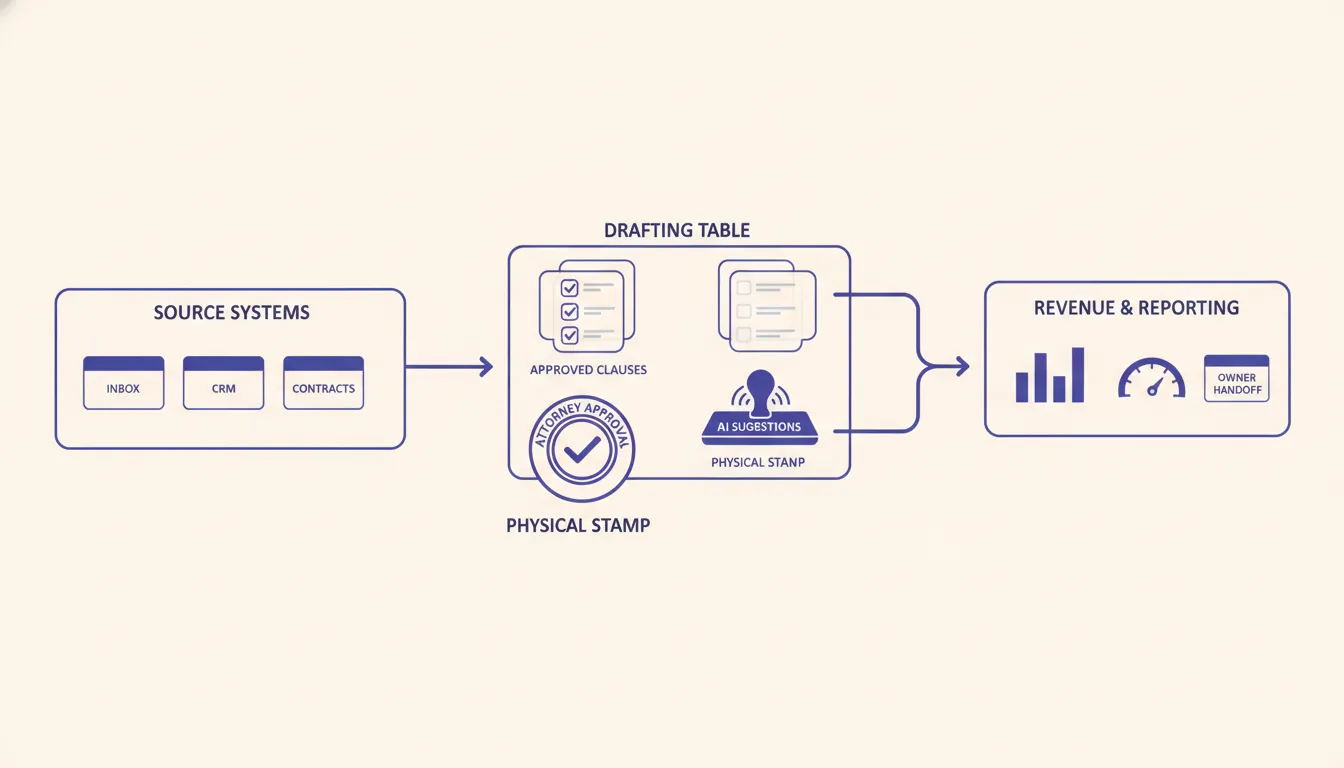
If a vendor cannot explain that boundary in plain language, the demo is ahead of the governance.
Treat client-data separation as a product feature
A law firm should not accept “we use enterprise security” as a complete answer. The buyer needs to know how records are separated in the actual product and workflow.
Ask:
- Is every document tied to a firm, client, matter, and user identity?
- Can one user's search, retrieval, or generation cross those boundaries?
- How are permissions tested, not just configured?
- Are prompts, temporary files, exports, and logs covered by the same separation?
- What data reaches an external AI provider?
- What are the provider's retention and training terms?
- Can access and generation events be audited by matter?
- What happens when a user selects the wrong client or uploads the wrong file?
This is where architecture claims need a release test. Create two synthetic matters with similar names and deliberately conflicting facts. Confirm that users, search, generation, exports, logs, and notifications stay inside the correct boundary. Then repeat the test with a user whose permissions should be denied.
I also want the firm to own the account structure, data, templates, exports, and credentials. If leaving the vendor means losing the approved-language library or the ability to reproduce a document, the subscription has become an operating dependency that deserves explicit acceptance.
Law firm document automation starts with intake quality
A document generator can only be as reliable as the facts entering it. Legal intake often arrives through forms, email, calls, PDFs, and staff notes. Those channels produce different labels, incomplete answers, and contradictions.
The system needs a validation layer before generation:
- Required facts are present.
- Dates use one accepted format.
- Names and entities match the matter record.
- Jurisdiction and document type are explicit.
- Conflicting answers become an exception.
- Uploaded files belong to the selected matter.
- The operator can see what is missing and who must resolve it.
My legal intake automation page covers that upstream step in more detail. I would rather stop a document because one fact is unresolved than create a polished draft that hides the uncertainty.
This also changes the software evaluation. A strong template builder with weak intake controls may create more cleanup work than a simpler platform connected to a disciplined matter process.
Test the review and release path
“Attorney reviews it” is not a workflow until the firm defines what review means.
A useful review record should answer:
- Which attorney reviewed the document?
- Which source template and clause versions were used?
- Which fields came from the matter system?
- Which language was changed after generation?
- Which exceptions were accepted?
- When was the draft approved?
- Who released it, and through which channel?
- Can the firm reproduce the version that was sent or filed?
Thomson Reuters describes document automation as document assembly from submitted form data into a template. That generation step is only one part of the process. The buyer should test the movement from submitted facts through review and final release.
The same authority model I use for AI agents applies here. Define what the software may read, prepare, recommend, change, and release. A system that can draft should not automatically gain permission to send.
For high-impact documents, I prefer a hard release gate. Approval should be tied to the exact version being released. If the document changes after approval, the approval should no longer apply.
Run a pilot that tries to break the process
Do not evaluate legal document automation software with a perfect sample matter. Use a contained pilot and include the cases most likely to embarrass the process later.
I would test at least these scenarios:
- Normal case: complete intake produces the expected document and routes it to the correct reviewer.
- Missing fact: generation stops and names the unresolved field.
- Conflicting facts: the system creates an exception instead of choosing silently.
- Wrong client: access and generation are denied across the matter boundary.
- Changed template: the output records the new version and invalidates stale approval.
- Rejected review: the document returns to the right owner with the reason preserved.
- Provider failure: the process stops safely without losing the matter state.
- Duplicate submission: the firm does not send or file the same document twice.
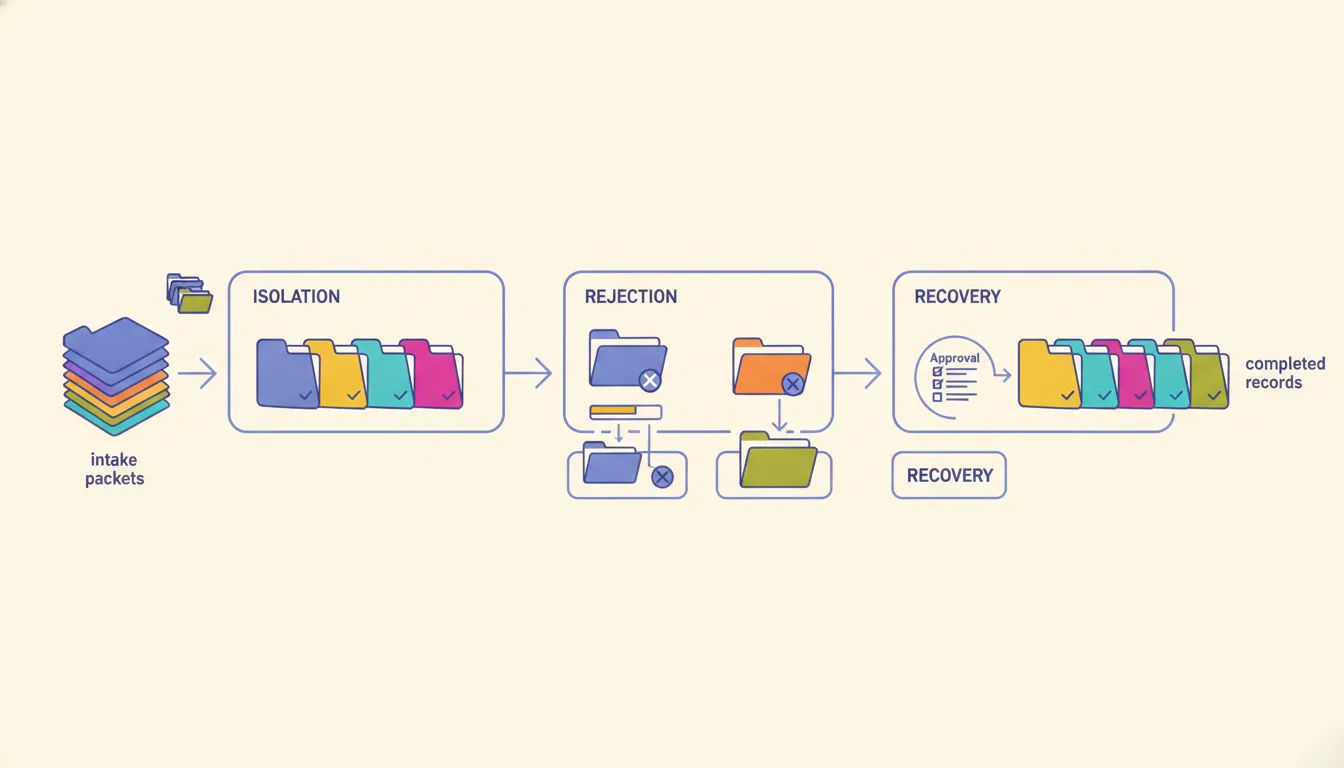
NIST's Generative AI Profile frames generative AI risk management as a distinct extension of its broader AI risk framework. A law firm does not need to turn a pilot into a standards exercise, but it should adopt the same practical instinct: identify the risk, test the control, and preserve evidence.
The pilot passes when an operator can show the correct document outcome and explain every failed case. A successful generation count is not enough.
When not to hire me for document automation
You do not need me when the firm has a common document type, clean matter data, approved templates, standard integrations, and a vendor that meets the separation, review, audit, and export requirements.
In that case, buy the packaged product. Keep the implementation narrow, clean the source templates, connect the matter data, train the owners, and test the release path.
A custom layer becomes reasonable when:
- The document process crosses several systems.
- The firm sells a standardized legal service through a client portal.
- Approved language depends on firm-specific rules.
- Matter isolation needs controls the packaged product cannot demonstrate.
- The process requires unusual validation or evidence.
- Several products each own part of the process but none owns the outcome.
My guide to legal workflow automation with n8n explains how a workflow tool can connect intake, matter systems, generation, review, and notifications without pretending the workflow engine is the legal system of record.
If the gap is genuinely custom, fix the process around it rather than forcing another isolated tool into the stack.
My final buying test
I would choose legal document automation software that can make one controlled document outcome repeatable without weakening attorney judgment or client confidentiality.
The software should prove five things:
- It starts from approved language and authoritative matter data.
- It keeps every client's records and context inside the correct boundary.
- It makes missing facts and conflicts visible.
- It preserves attorney review and exact-version release authority.
- It leaves an audit trail another operator can understand.
The best demo will usually emphasize speed. The better buying decision asks what the firm can trust, prove, recover, and still own after the demo is over.
If you want help mapping one document process before you buy, my automation services page shows how I scope that work.
FAQ
Frequently asked questions
01What is legal document automation software?
Legal document automation software turns approved templates, matter data, and conditional rules into draft legal documents. The useful product includes intake, validation, review, version control, and release evidence around that generation step.
02How should a law firm choose document automation software?
Choose against one real document process. Test approved-language control, client-data separation, integrations, exception handling, attorney review, audit history, export, and recovery before expanding the platform.
03Should legal document automation use generative AI?
It can, but the authority boundary matters. AI may help classify intake, locate approved clauses, summarize differences, or prepare a draft. An attorney should remain responsible for substantive legal judgment and release.
04What should a legal document automation pilot include?
Use one frequent, rules-based document with an approved template and a named owner. Run normal, missing-data, conflicting-data, wrong-client, changed-template, and rejected-review cases through the full process.
05When is custom legal document automation worth considering?
Consider a custom layer when the process crosses several systems, uses firm-specific approved language, requires strict data separation, or needs a client-facing product that an off-the-shelf template tool cannot support cleanly.
06Is document automation for law firms safe with client data?
It can be, if every document is tied to a client, matter and user, and the product proves those boundaries hold. I test it with two made-up matters that have similar names and conflicting facts, then check that search, drafts, exports and logs never cross between them. If a vendor only says it uses enterprise security, ask to see that test.
