
Field note
Jul 13, 2026
Office management system: the operator control test
An office management system should control handoffs, approvals, exceptions, and proof across the back office, not just collect tasks in one more dashboard.


An office management system sounds like software for calendars, tasks, files, and reminders.
That definition is too small.
I look at an office management system as the control layer for recurring back-office work. It should tell the team what arrived, which record is trusted, who owns the next decision, what is blocked, and what proof exists after the work is done. IBM's explanation of business process management is useful here because it frames process management as ongoing analysis and improvement, not a one-time software installation.
If it cannot answer those questions, it is probably another place to check.
I have seen this problem inside a CE21 to GoHighLevel sync. On the surface, the job was simple: move contacts from one system to another. In practice, contacts were missing, member levels had to land correctly, event dates arrived in inconsistent formats, and downstream follow-up depended on clean records. The automation could run successfully while the operating result was still wrong.
That is the danger. Activity is not control.
My rule is simple: normal work should move quietly, while exceptions should become impossible to ignore.
That is also why I start with business process automation, not a giant office software shortlist. The useful question is not which platform has the longest feature page. It is which operating lane needs an owner, a source of truth, an approval rule, and visible proof.
Define the office lane before choosing the system
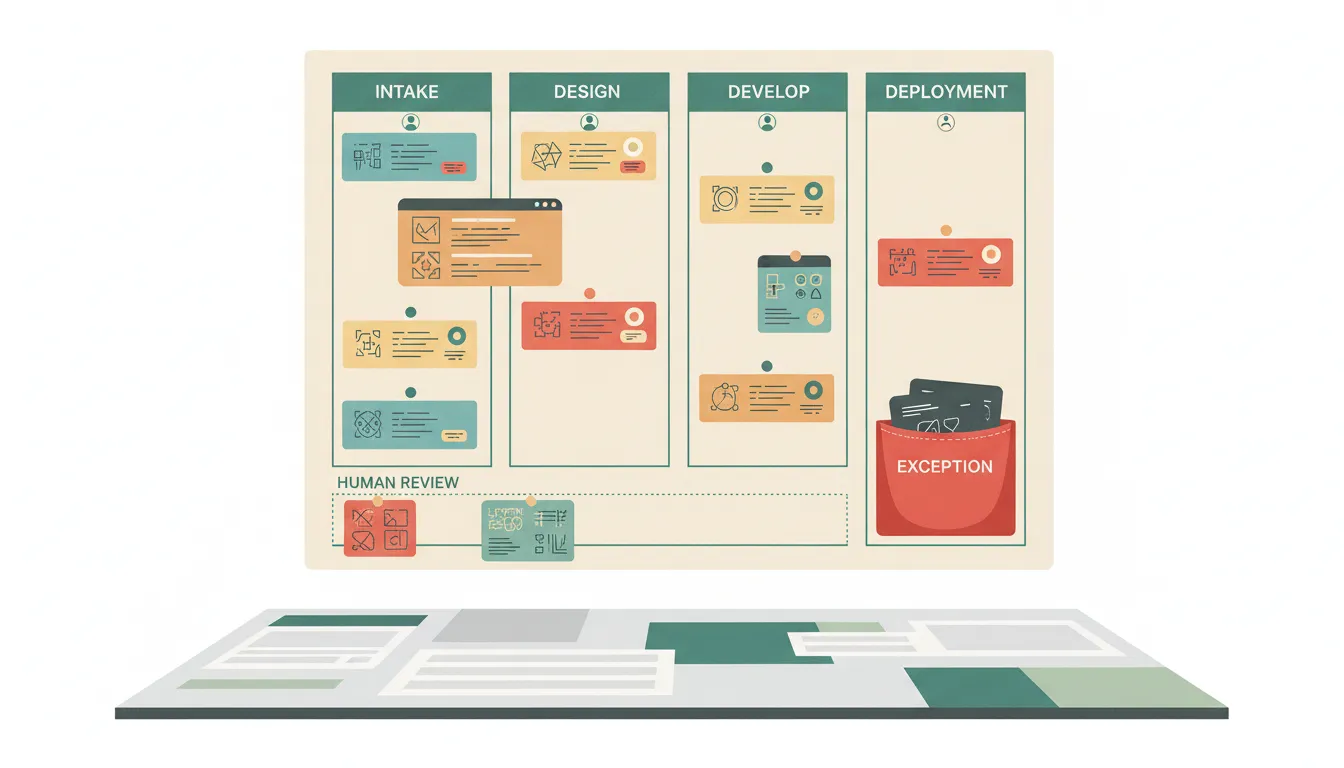
An office lane is a recurring path from request to completed outcome.
It might be:
- A vendor invoice arriving, being coded, approved, paid, and filed.
- A new lead entering the CRM, being assigned, contacted, and reviewed.
- A customer document being requested, validated, stored, and acknowledged.
- A purchase request moving from an employee to a manager and then finance.
- A meeting producing decisions, tasks, deadlines, and follow-up.
- A new hire moving through paperwork, access, equipment, and first-week checks.
Before I automate any of those, I want seven answers:
- What starts the lane?
- Which system receives the request first?
- Which record is the source of truth?
- What information must exist before work can move?
- Who owns the next decision?
- What happens when the normal rule does not fit?
- What proof should a manager be able to review later?
This is the practical value of business process architecture. It turns vague office work into a map the team can inspect. Without that map, software tends to preserve every bad handoff and add notifications around it.
I would rather map one leaky lane than configure twenty modules nobody trusts.
Test the system against handoffs, not features
Most office software demonstrations show the happy path. A form is complete. A task has one owner. Every integration is connected. Every approval happens on time.
Real operations are different.
A request arrives without an account number. Two customer records have nearly identical names. A manager is out. A vendor changes its payment details. A spreadsheet uses a different date format. An employee replies in email instead of the portal. An API accepts a request but fails to create the downstream record.
The office management system earns its value at those edges.
For every important handoff, I test four controls:
Required information. The lane should stop early when a critical field is missing. Bad input should not travel through three systems before somebody notices.
Named ownership. The system should show who owns the current decision, not just which department is generally responsible.
Approval boundary. Routine work can move automatically. Money movement, customer commitments, access changes, unusual discounts, and ambiguous records should have explicit review rules.
Proof of completion. A green status is not enough. The record should show what changed, when it changed, and which system now holds the trusted result.
That is the difference between task movement and workflow management for operators. A task list tells me people are busy. A controlled workflow tells me whether the business promise was kept.
Do not centralize everything just to create one dashboard
A common buying mistake is assuming every office function needs to live in one platform.
I do not think that is necessary.
The CRM can remain the source of truth for customers. The accounting system can remain the source of truth for invoices and payments. The document store can remain the source of truth for signed files. The scheduling system can remain the source of truth for appointments.
The management layer should coordinate those systems without pretending one database is best at every job.
I have built more than 500 production workflows. The reliable pattern is not one giant application. It is a visible control layer with narrow integrations, explicit rules, and failure alerts. I prefer tools I can inspect and troubleshoot because black-box automation makes a bad office process harder to diagnose.
On one operation, a team was manually checking 20 accounts and could only complete the round once or twice per day. With automation, monitoring could happen four or five times per day with continuous coverage. The gain did not come from replacing every application. It came from watching the lane, collecting the right signals, and putting exceptions in front of a person.
That is a much better office management system test than asking whether the platform includes chat, documents, projects, forms, and AI.
Give AI a narrow office role
AI can make office operations faster, but it should not become an invisible manager.
I use AI for work such as:
- Classifying incoming requests.
- Extracting fields from documents and messages.
- Summarizing a case before review.
- Matching a request to a policy or operating rule.
- Drafting a response for approval.
- Scoring urgency based on defined criteria.
- Producing an exception digest for the operator.
I do not let confidence language replace a real approval gate. If a decision changes money, access, customer commitments, compliance posture, or the system of record, a named owner should still control the move.
The NIST AI Risk Management Framework gives businesses a useful structure around governing, mapping, measuring, and managing AI risk. In my operating language, that means the office system needs scope, review rules, monitoring, and a way to stop the workflow when reality does not match the model.
The same principle applies to an AI agent workflow: start with one business promise, define ownership, add approval gates, and require proof before trusting an agent to act.
Build the weekly operator review into the system

A useful office management system should reduce meetings, not create another dashboard meeting.
I like one short weekly review built around exceptions and evidence. The system should prepare the packet automatically and answer:
- Which requests exceeded the expected cycle time?
- Which approvals are still waiting?
- Which records failed validation?
- Which automations retried or failed?
- Which cases needed manual correction?
- Which recurring exception deserves a process change?
- Which metric moved in the wrong direction?
This is where report automation becomes operational instead of decorative. A report should not just summarize volume. It should show where ownership, timing, or data quality broke down and what decision is needed next.
I also use a simple workflow optimization scorecard before expanding the system. If the lane still has no clear owner, inconsistent intake, hidden exceptions, or weak proof, adding more automation will multiply the problem.
The review should end with a small number of decisions. Fix the intake field. Change the approval threshold. Assign a backup owner. Retire a duplicate spreadsheet. Add an alert. Remove a step that no longer protects anything.
That is continuous improvement an operator can actually manage.
When an office management system is not worth automating
I would not recommend hiring me to automate a lane that happens rarely, has no stable inputs, or costs less to handle manually than it would cost to maintain the workflow. I would also hold off when the team cannot name an owner or agree on the correct result. In those cases, a checklist and one accountable person are better than custom software.
The U.S. Small Business Administration's guidance on managing a business is a useful reminder that operations include finances, employees, compliance, and day-to-day administration. Not every one of those responsibilities needs a new automation layer. The work needs enough repetition, consequence, and clarity to justify one.
Use this office management system buying test
Before buying or building, score the proposed system from zero to two on each question:
- Does every recurring request enter through a defined intake path?
- Is the source of truth clear for each record type?
- Can the system name the current owner?
- Are required fields validated before work moves?
- Are approval rules explicit?
- Are exceptions separated from routine work?
- Can a manager see proof of completion?
- Are failures and retries visible?
- Can the team change rules without rebuilding everything?
- Does the weekly review produce decisions instead of screenshots?
A low score does not mean the company needs a larger platform. It usually means the operating lane is not defined yet.
Start with one lane. Map the current handoffs. Name the owner. Decide what can move automatically. Decide what requires approval. Create the exception queue. Attach proof. Then use a controlled build such as an n8n consulting engagement to test where reality breaks the design.
If you want a practical starting point, the free AI operations audit is designed to identify the lane where tighter control can create the clearest business result.
An office management system should not make the office look organized.
It should make ownership, exceptions, and outcomes easier to trust.
FAQ
Frequently asked questions
- 01What is an office management system?
- An office management system coordinates recurring administrative work such as intake, approvals, records, scheduling, purchasing, reporting, and follow-up across people and software.
- 02What should an office management system include?
- It should include a clear source of truth, named owners, required fields, approval gates, exception handling, status visibility, and proof that work was completed.
- 03How is an office management system different from project management software?
- Project management software tracks planned work. An office management system should also control recurring operational handoffs, system records, approvals, and exceptions.
- 04What should a business automate first in office management?
- Start with the recurring lane where missing information, duplicate entry, delayed approval, or unclear ownership already creates visible operating pain.
