
Field note
Jun 22, 2026
CMMS software for manufacturing: operator controls
CMMS software for manufacturing only pays back when the maintenance workflow has clear intake rules, exception owners, source records, and proof before replacement.


CMMS software for manufacturing is usually bought as if the problem is software selection.
Most of the time, the problem is operating control.
A plant can buy a better maintenance system and still have requests entering through email, radio notes, supervisor texts, vendor portals, inspection PDFs, and spreadsheets. The CMMS becomes one more place someone has to update after the real work already moved somewhere else.
IBM describes a computerized maintenance management system as software that centralizes maintenance information and supports work order, asset, inventory, and preventive maintenance workflows. That is the correct category. It is not the whole decision.
The buyer question is not, "Which CMMS has the longest feature list?" The buyer question is, "Which maintenance workflow can we trust when production is waiting, the asset record is stale, and the supervisor needs proof before approving the next move?"
I have seen the same before-state in adjacent operations builds: spreadsheets, whiteboards, word-of-mouth, and the one person who knows what actually happened. Manufacturing maintenance teams feel that pattern when the CMMS exists but the real queue still lives outside it.
My facilities-maintenance strategy is explicit about this niche: the opportunity is AI automation layers for teams stuck with legacy systems, not a replacement-software strategy. The systems around the work are usually CMMS, ERP, spreadsheets, vendor portals, email, PDFs, and existing workflows.
That is the frame for buying CMMS software for manufacturing. Start with the controls that make maintenance work visible. Then decide whether the current CMMS can support them.
Start with the work order lane
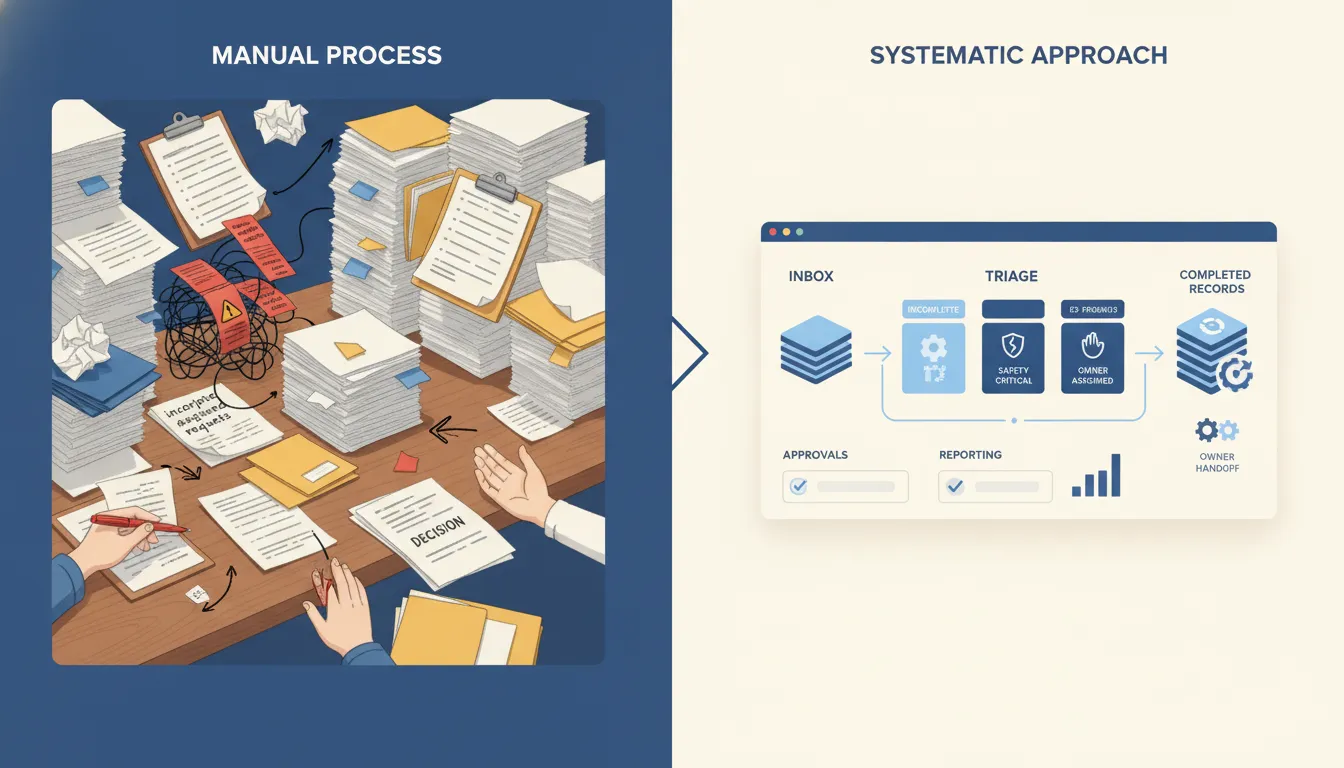
The work order is the main operating object.
If the work order lane is vague, the CMMS decision will be vague. The team will debate dashboards, mobile apps, QR codes, parts inventory, and vendor portals before agreeing on what a safe request looks like.
For manufacturing operators, a work order lane should answer five questions before anyone debates vendors:
- Where can a request enter?
- What fields are required before maintenance accepts it?
- Which system owns asset, location, priority, and safety context?
- Which exceptions block the next step?
- What proof shows the work was completed, deferred, or escalated?
That is why business process automation belongs in the conversation before a software replacement. The automation is not there to make the plant look modern. It is there to turn messy intake into a controlled queue.
A request that says "line three making noise" is not the same as a work order. A request that names the asset, line, symptom, production impact, safety concern, photo, reporter, current owner, and escalation rule is something a supervisor can act on.
This is also where workflow management for operators matters. The maintenance team does not need a prettier task board. It needs clear ownership, exception lanes, and proof that the work moved for a reason.
Do not let CMMS selection hide source-of-truth problems
A manufacturing maintenance workflow often touches more systems than the CMMS vendor demo shows.
The CMMS may own the work order. The ERP may own parts or purchasing. A spreadsheet may own a local priority rule. Email may hold the vendor quote. A PDF inspection may contain the issue that started everything. A supervisor may know the production constraint that changes the priority.
If the team cannot name which source wins, the new CMMS will not fix the workflow. It will just move confusion into a more expensive screen.
This is where legacy system modernization should be interpreted carefully. Modernization does not always mean replacing the old system. It can mean wrapping a controlled layer around old systems so requests, updates, approvals, and proof move consistently.
The NIST AI Risk Management Framework is useful here because it pushes teams to govern, map, measure, and manage systems instead of trusting output alone. A maintenance automation layer should follow the same discipline. It should show what data it used, where the record came from, what confidence is low, and which human owns the exception.
My ownership principle is direct: all code, all data, and all credentials should stay in infrastructure the operator owns. For manufacturing maintenance, the same idea applies to operating rules. The plant should own the rules, source records, approval trail, and final decision.
The first automation layer should sit beside the CMMS
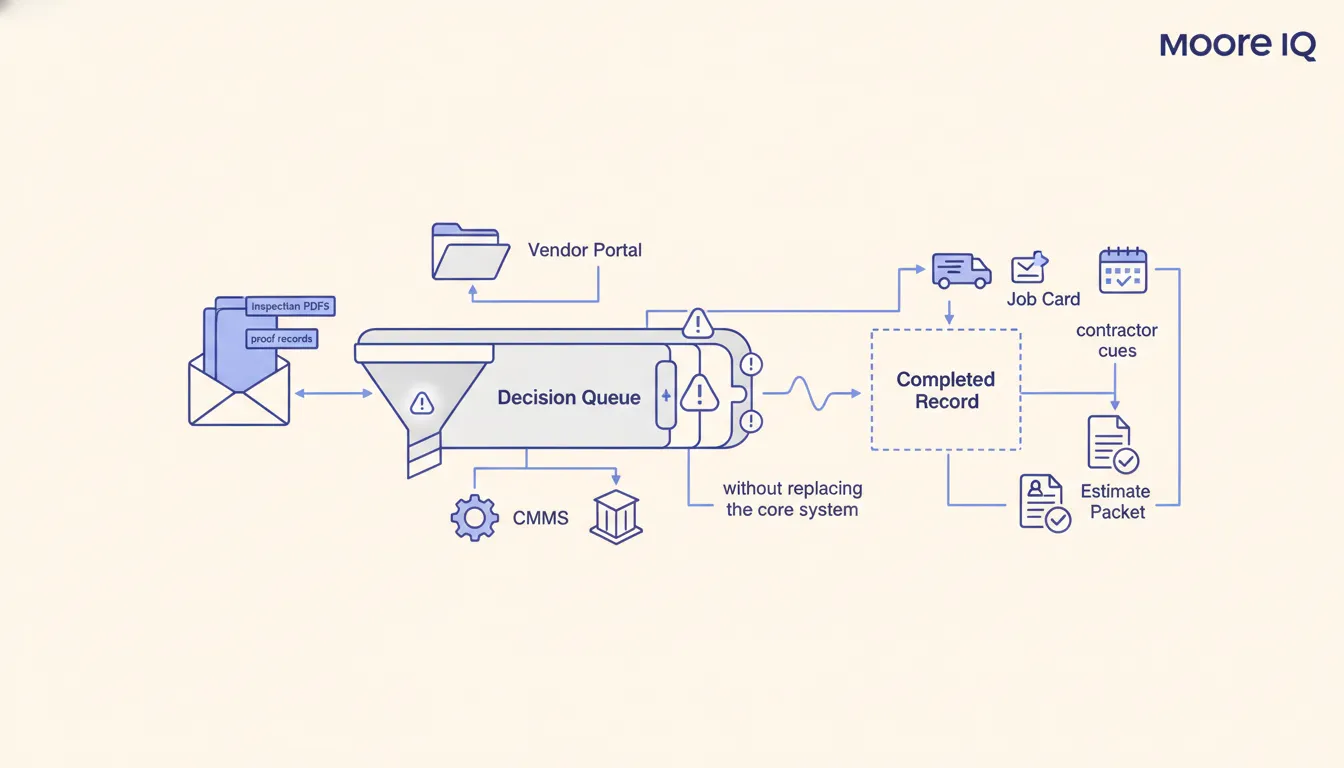
The safer first project is often not a CMMS replacement. It is a narrow automation layer beside the current CMMS.
That layer can:
- Read requests from email, forms, shared inboxes, or PDFs.
- Extract asset, line, symptom, priority, reporter, and photo fields.
- Check whether the asset exists in the CMMS.
- Flag missing fields before a work order is accepted.
- Route safety, downtime, vendor, or parts exceptions to the right owner.
- Draft the CMMS update for human review.
- Summarize open exceptions before the maintenance meeting.
- Create a proof record after completion or deferral.
That is the same sequence argued in before you replace your CMMS, automate these handoffs. If the pain lives in intake, dispatch, inspections, reporting, or vendor follow-up, automation around the system usually pays back before replacement.
Manufacturing makes this especially important because downtime pressure changes behavior. When the line is waiting, people bypass systems. They call the person who can fix the problem. The CMMS gets updated later, if it gets updated at all.
An automation layer should not fight that reality. It should capture the signal wherever it appears, normalize it into a work order lane, and keep the human owner visible.
The operating cadence point is practical. In one manual environment, 20 accounts with zero automation were checked only once or twice per day. With automation, the process could run four or five times per day with 24-7 monitoring. The manufacturing lesson is not that every request should become instant automation. The lesson is that handoffs improve when the system watches the queue instead of waiting for someone to remember it.
Preventive maintenance still needs an owner
Preventive maintenance is one of the strongest reasons manufacturers look at CMMS software. The risk is that the schedule looks clean while the real ownership stays vague.
ISO describes asset management as coordinated activity to realize value from assets. In a plant, that value does not come from a recurring task existing on a calendar. It comes from the maintenance team knowing which asset matters, when the work should happen, who owns deferral, and what proof closes the loop.
Predictive maintenance in manufacturing has the same operator pattern. A warning is only useful when it becomes a controlled handoff from signal to work order, downtime decision, and verified fix.
For CMMS software selection, that means the buyer should test more than scheduling features. Ask:
- Can the system show which preventive tasks are overdue by production impact, not just date?
- Can a supervisor defer work with a reason and owner?
- Can inspection notes become structured exceptions?
- Can the system preserve proof when a technician finds a different issue than expected?
- Can a manager review completed, deferred, and escalated work without rebuilding a report by hand?
If the answer is no, the issue may be the CMMS. It may also be the operating layer around the CMMS.
Vendor dispatch and outside work need their own controls
Manufacturing maintenance teams often depend on outside vendors for specialized equipment, parts, compliance work, or overflow labor. That creates another gap that CMMS demos can understate.
A vendor handoff needs more than a name in a field. It needs assignment, scope, due date, status, proof, escalation, invoice context, and a clear owner inside the plant.
That is where vendor dispatch and SLA tracking for facilities teams fits. Vendor work breaks when status lives in email threads and SLA risk is noticed too late.
Before choosing CMMS software for manufacturing, test the vendor lane:
- How does vendor work enter the system?
- Who approves the vendor before dispatch?
- Where does the vendor quote live?
- How is status collected without chasing email threads?
- Who gets alerted when the vendor misses the window?
- How does invoice reconciliation connect back to the work order?
If those answers live outside the CMMS, replacing the CMMS may not solve the pain. The better move may be a dispatch automation layer that watches the vendor thread, updates the internal record, and flags the exception before the production meeting.
When not to hire us for CMMS automation
Do not hire us for CMMS automation if the team only wants a tool shortlist, a feature comparison, or a way to make messy maintenance habits look official.
Do not hire us if no one is willing to name the owner for intake, asset priority, vendor status, or deferral approval. That is not an automation problem yet. It is an operating decision that leadership has to make first.
Hire us when the team is ready to define the lane, keep humans on exceptions, and automate the handoffs that waste supervisor time.
When a new CMMS is actually the right move
Do not avoid replacement forever.
A new CMMS is worth considering when the current system cannot support the operating model the plant has already defined.
Replacement is more justified when:
- Asset records cannot be trusted or cleaned.
- Required work order fields cannot be enforced.
- Mobile completion proof is impossible or too painful.
- Preventive maintenance schedules cannot be managed safely.
- Integrations are blocked in a way that keeps records trapped.
- Reporting cannot separate completed, deferred, escalated, and vendor-owned work.
- The system creates more manual cleanup than it removes.
But the sequence matters. If the plant has not defined intake rules, ownership, source records, exception handling, and proof, a new CMMS will inherit the old habits.
My facilities and maintenance page frames the offer as automation layers for work order intake, CMMS handoffs, vendor dispatch, inspections, preventive maintenance, and reporting without replacing legacy systems. That does not mean replacement is never right. It means replacement should happen after the operating lane is clear.
The operator scorecard before buying
Use this scorecard before buying, replacing, or heavily customizing CMMS software for manufacturing.
Give each question a clear owner before the vendor demo becomes the decision.
- Intake: Which channels are allowed to create maintenance requests?
- Required fields: What minimum information turns a request into a work order?
- Asset priority: Which record decides priority when production, safety, and maintenance disagree?
- Source of truth: Which system wins for asset, parts, vendor, and completion data?
- Exceptions: Which conditions block automatic routing?
- Approvals: Who approves downtime, vendor work, parts spend, and deferrals?
- Proof: What evidence closes the loop?
- Reporting: What does the supervisor need every morning without manual rebuild?
- Integration: Which handoffs should be automated before replacement?
- Ownership: Who maintains the rules after go-live?
If the scorecard is blank, do not start with a software shortlist. Start with the operating lane.
If the scorecard is mostly clear, a CMMS refresh can become a real buyer decision instead of a feature comparison.
The practical first step is an AI Operations X-Ray. Use it to find the maintenance handoff that leaks the most time, risk, or proof. Fix that lane first. Then decide whether the CMMS needs to be replaced, wrapped, or simply used with better controls.
FAQ
Frequently asked questions
01What is CMMS software for manufacturing?
CMMS software for manufacturing helps maintenance teams manage work orders, assets, preventive maintenance, inventory, and maintenance records across a plant or production environment.
02When should a manufacturer replace its CMMS?
Replace the CMMS when the current system cannot support required asset records, work order ownership, integrations, or compliance proof. If the real pain is intake, copying, vendor follow-up, or reporting, automate the handoffs first.
03What should operators define before buying CMMS software?
Define where requests enter, which system owns asset and priority data, who approves exceptions, how vendor status is tracked, and what proof a supervisor needs before trusting the workflow.
04Can AI help with manufacturing maintenance without replacing the CMMS?
Yes. AI can classify requests, extract work order fields, summarize inspection notes, route exceptions, prepare updates, and produce review reports while the CMMS remains the system of record.
