
Field note
Updated Sep 30, 2026
Construction management software for small business
Construction management software for small business should keep every job, change order, trade handoff and invoice in view. Here is how I test it before buying.


Construction management software for small business should give you one trusted record for every job, from the first estimate to the final payment. It should show who owns each job, what changed, what is blocked and what is ready to bill. If it cannot do that when things go wrong, the feature list does not matter.
I cover this as part of my AI automation for trades contractors work.
Most of this software is still sold as a feature contest. One product has a cleaner schedule. Another has more templates. Another promises estimates, daily logs, change orders, customer messages, subcontractor coordination, photos, and accounting in one place.
I think that is the wrong way to buy.
A small contractor does not need the most software. The business needs one reliable operating lane from the first request through final payment. Every active job should have a trusted record, a current owner, a next action, an approved scope, visible exceptions, and enough evidence to support billing.
I learned the cost of missing that control on a production workflow that tracked billable usage. The automation never threw an obvious error. It kept running, but a logic problem stopped one client's usage from being assigned correctly. The gap appeared at month end, when the charge should have been prepared. There was no honest way to reconstruct the missing amount, so the business had to absorb a full month of usage.
That is the failure I want a buyer to think about. A red error screen is inconvenient. A system that quietly produces the wrong numbers is expensive.
After building more than 500 production-grade workflows, my opinion is firm: automation is not the most important software feature. Controlled recovery is.
Start with what you promise customers and crews
Before I compare products, I ask what the company has promised customers, crews, and itself.
A general contractor may promise that every approved change reaches the schedule, budget, subcontractor, and customer record before the work proceeds. A remodeler may promise that every lead receives an owned estimate decision within one business day. A specialty contractor may promise that completed work becomes invoice-ready within 24 hours. A home builder may promise that selections, change orders, inspections, and client updates stay attached to the right job.
The promise gives the buying process a target. Without it, the team will compare screens instead of testing operations.
My contractor automation model begins with leads, quotes, job documentation, follow-up, and collections because those handoffs are where revenue and trust usually leak. The software should make the promise easier to keep. It should not force the company to rebuild every process around a vendor's menu.
I want six answers before a demo:
- What event creates a customer, opportunity, and job?
- Which system owns the trusted record for each one?
- Who owns the next action at every stage?
- What requires approval before work or money moves?
- Which exceptions stop the normal lane?
- What proves the update reached the next system?
If those answers are unclear, the software decision is early. The way the company runs is still spread across personal habits.
Separate the records before connecting the tools
Small construction companies rarely run on one system. That is true of most small construction company software: each tool owns part of the job, and none of them owns all of it.
A CRM may own the lead and customer. Estimating software may own the proposal. Project software may own the job, schedule, drawings, and daily log. Email and text messages may hold the latest customer decision. A foreman's phone may hold the only useful photo. Accounting software may own costs, invoices, and payments.
The goal is not to pretend one product owns everything. The goal is to declare authority.
I use a simple record map:
- Customer: Who is buying, who can approve, and how should the team communicate?
- Opportunity: What is being estimated, what is the expected value, and what is the next commercial action?
- Job: What scope was sold, what phase is active, who owns it, and what is blocked?
- Schedule: Which commitments, dependencies, inspections, and trade dates are current?
- Document: Which drawing, selection, contract, certificate, or approval is the current version?
- Cost: What was budgeted, committed, changed, incurred, and approved?
- Invoice: What is billable, what evidence is required, and what is holding payment?
This is why I tell home builders to track jobs rather than contacts. A sales-only CRM can be useful, but it should not become a fake project system just because the team already pays for it.
The same principle guides my business process automation work. I would rather connect a narrow, controlled lane around capable systems than create another competing source of truth.
Test how it handles change orders
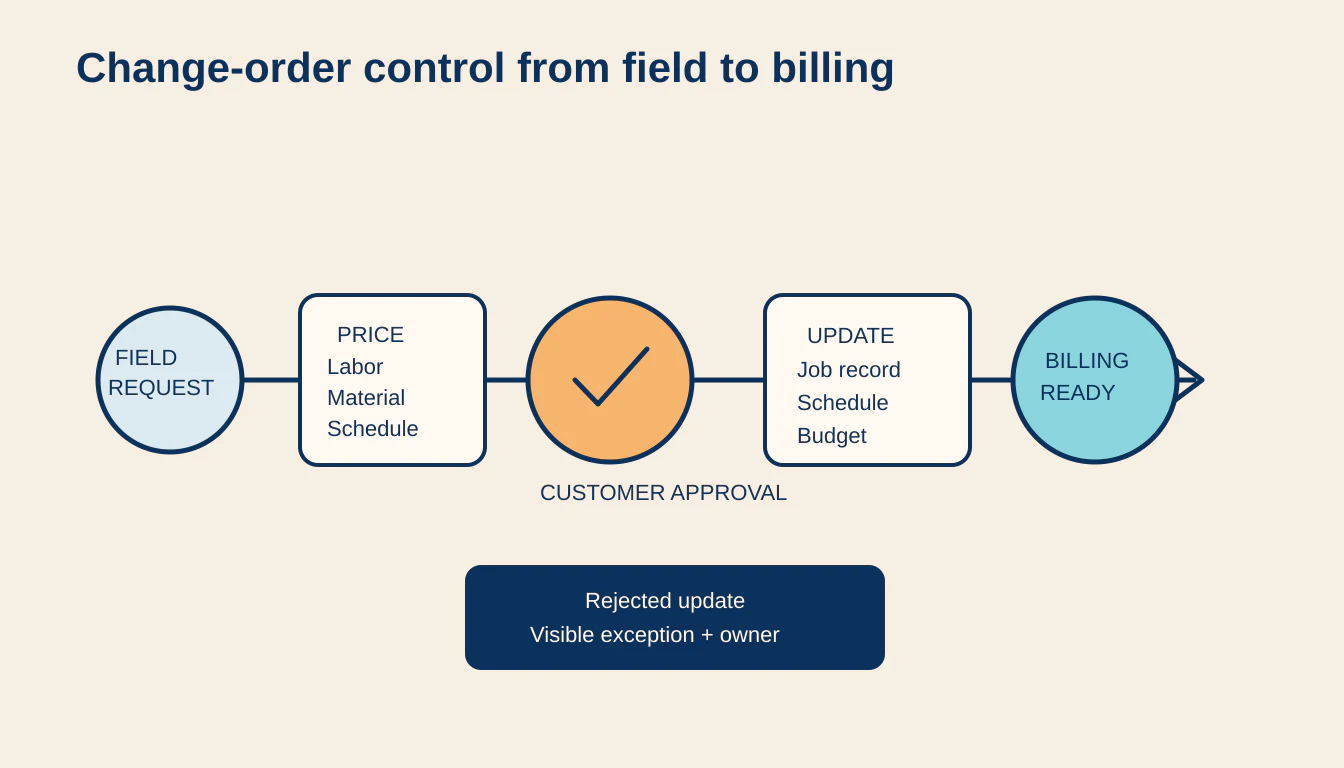
Change orders expose weak construction software quickly because they touch scope, customer communication, schedule, purchasing, subcontractors, cost, margin, and billing at the same time.
I test the full path, not the form:
- A field condition or customer request creates a proposed change.
- The request is attached to the correct job, location, drawing, and scope.
- The right person prices labor, material, equipment, overhead, and schedule impact.
- The customer receives one clear version for approval.
- Approval is time-stamped and preserved with the approved scope.
- The budget, commitments, schedule, field instructions, and billing plan update.
- Any rejected update becomes a visible exception with an owner.
On one equipment and environmental services build, I created a quoting lane where a rep could describe the work in normal language and move it into a structured quote process. The useful part was not the text generation. It was turning field knowledge into a commercial record that could be reviewed before it moved forward.
Construction management software for small business should do the same kind of control work. A superintendent's text message is not an approved change. A signed document is not enough if the cost and schedule never update. An integration response is not proof that accounting accepted the record.
My rule is simple: no changed work should disappear between field reality and financial truth.
Test the schedule, not just the calendar
A calendar view can look excellent while the operating schedule remains unreliable.
Construction dates depend on permits, selections, long-lead material, crew capacity, subcontractor acknowledgement, inspections, access, weather, predecessor work, and customer decisions. A useful system should show why a date is at risk, not just paint it red after it slips.
I look for these controls:
- Every commitment has one owner and one current status.
- Subcontractor assignment is different from acknowledgement.
- A delayed material or inspection can expose affected downstream work.
- A changed date creates the right notifications without spamming everyone.
- The team can see unconfirmed, blocked, and stale commitments in one review lane.
- A manager can override automation and preserve the reason.
- The schedule can reconcile after offline field updates arrive late.
That is what workflow management looks like in practice. Ownership, a visible list of stuck work, and proof matter more than moving cards between columns.
A small team may not need advanced critical-path modeling. It does need a morning view that answers: what changed, what is blocked, who owns the next move, and which promise is about to break?
Protect field evidence, safety, and closeout
Construction software becomes valuable when field activity turns into usable evidence without creating a second clerical job.
Daily logs, photos, delivery tickets, inspection results, time, equipment use, safety observations, punch items, and customer decisions should attach to the correct job and date. The system should work when connectivity is poor, preserve the original evidence, and surface conflicts instead of quietly choosing one version.
The OSHA recordkeeping guidance is a useful reminder that records have to remain retrievable and meaningful. Software can support that discipline, but it does not create a safety program by itself.
I keep explicit human approval around safety stops, unusual spend, disputed scope, sensitive customer messages, and irreversible financial actions. AI can extract information, summarize logs, detect missing fields, draft updates, and prepare an exception queue. It should not silently decide that a hazard is minor or that disputed work is ready to invoice. The NIST AI Risk Management Framework is useful here because it makes governance, measurement, and ongoing risk management part of the operating system rather than a one-time model check.
The same checks from my field service software guide apply here too. Offline behavior, completion evidence, dispatch acknowledgement, and financial readiness must survive real field conditions.
Closeout deserves the same rigor. A job marked complete may still be missing a signed change, inspection record, warranty document, lien waiver, subcontractor invoice, customer acceptance, or final photo. The operator should see exactly why the job is not financially closed. The SBA finance management guidance reinforces the basic need to keep financial records and understand the business's money position. Construction closeout is where the operating record must become reliable financial input.
Test what happens when things go wrong
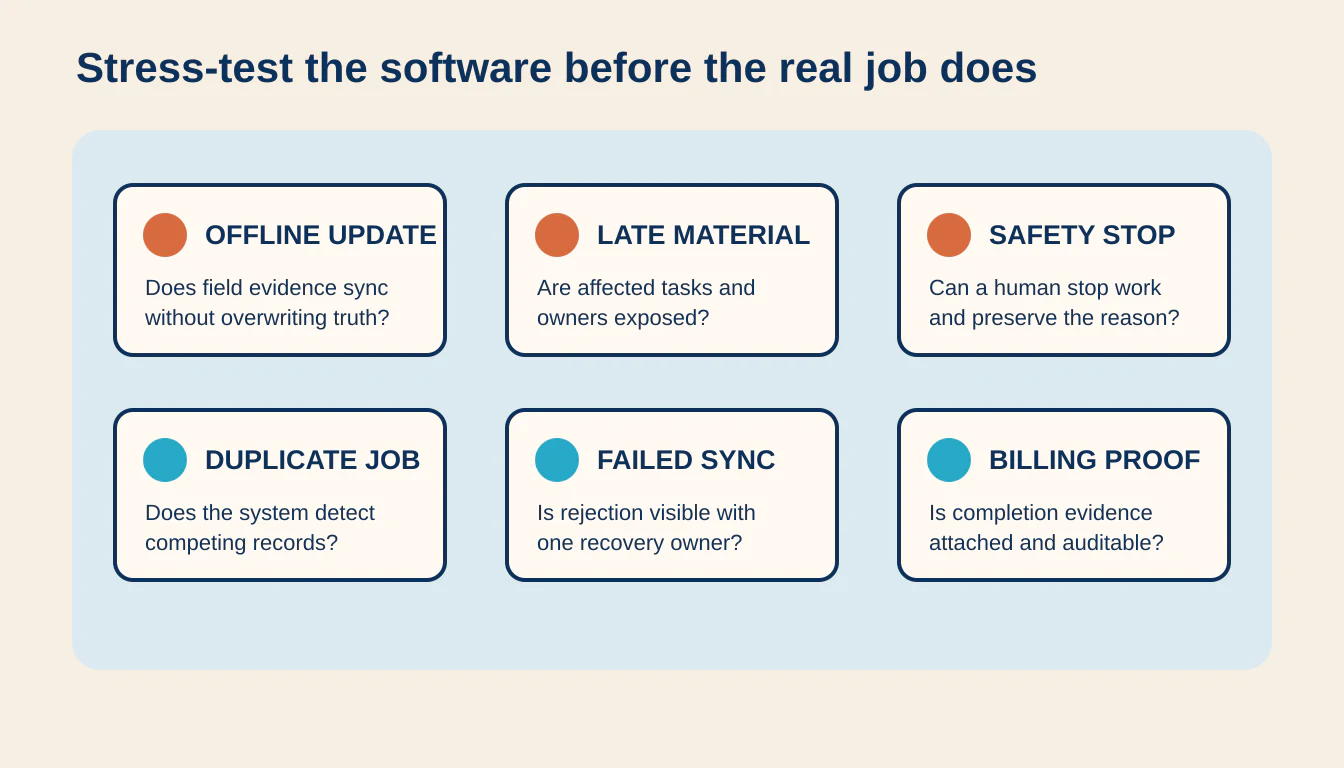
A polished demo follows the happy path. I want the uncomfortable path.
Before buying, I would ask the vendor or implementation team to show what happens when:
- A lead arrives twice through web form and phone intake.
- An estimator creates a job before the CRM opportunity is closed.
- Two people upload different drawing versions.
- A subcontractor receives an assignment but never acknowledges it.
- A material delivery slips and affects three downstream activities.
- A foreman records work offline and syncs after the office changes the schedule.
- A customer approves a change after the original work date passes.
- The approved amount differs from the accounting update.
- A safety observation should stop normal work.
- A completed task is missing the photo, signature, or inspection needed for billing.
- An integration reports success, but the destination record is unchanged.
- A user leaves the company while owning active jobs and approvals.
I score each scenario from zero to two. Zero means the failure is hidden or handled informally. One means the team can recover with a documented manual step. Two means the system detects the issue, preserves the evidence, assigns an owner, and proves reconciliation.
The buying test covers ten controls: record authority, required information, ownership, approvals, dependency visibility, field resilience, exception handling, audit evidence, financial readiness, and data portability. A perfect score is not required. The buyer does need to know which gaps remain manual and who owns them.
The benefits of an automated workflow appear when a repeated handoff becomes faster and more reliable. They disappear when the company adds another login, another duplicate record, and another place to check for failures.
When not to hire me or buy a larger system
Do not hire me for a major construction software change when the team cannot agree on job stages, change approval, schedule ownership, or completion standards. Software will hard-code the disagreement and make it harder to diagnose.
I would also hold off when job volume is low, the current accounting and scheduling tools are reliable, and one operator can see every exception. A shared checklist, a disciplined job folder, and a short daily review may be enough.
Sometimes the right first move is narrower:
- Normalize estimate requests from email and web forms.
- Create one owned follow-up queue.
- Route approved changes into the job and accounting handoff.
- Check completion evidence before invoicing.
- Reconcile failed updates every day.
That sequence creates proof before a replacement project. It also shows which product category the business actually needs.
Construction management software for small business should win because the operator can trust the job record, see what is blocked, control changed scope, coordinate trades, preserve field evidence, and turn completed work into accurate billing.
If it cannot do that under real failure conditions, the feature list does not matter.
More on this: CRM for remodelers.
If estimates and change orders are where your jobs leak money, my AI estimating software for contractors page shows the first piece I would build.
FAQ
Frequently asked questions
01What is construction management software for small business?
It is an operating system for coordinating leads, estimates, jobs, schedules, documents, change orders, subcontractors, field updates, costs, closeout, and billing across a small construction company.
02What should a small contractor automate first?
Start with one repeated handoff that affects revenue or customer trust, such as estimate follow-up, approved change orders, daily field updates, completion evidence, or invoice readiness.
03Should construction management software replace a CRM and accounting system?
Not automatically. Declare which system owns each record, then connect events and approvals without creating competing customer, job, cost, or invoice records.
04How should a small business compare construction management software?
Test the software against real failure conditions, including missing scope, late materials, offline updates, disputed changes, unacknowledged assignments, duplicate jobs, and rejected accounting updates.
05What construction software does a small business actually need?
Most small construction companies need three things working together: a place for leads and customers, a place for jobs and schedules, and accounting. One product can cover more than one of those, but it does not have to. I start with whichever handoff between them leaks the most money today.
